
Pi Desktop
A polished, multi-tab desktop GUI for the Pi coding agent. Open it and start typing — no terminal, no Node.js, no setup.
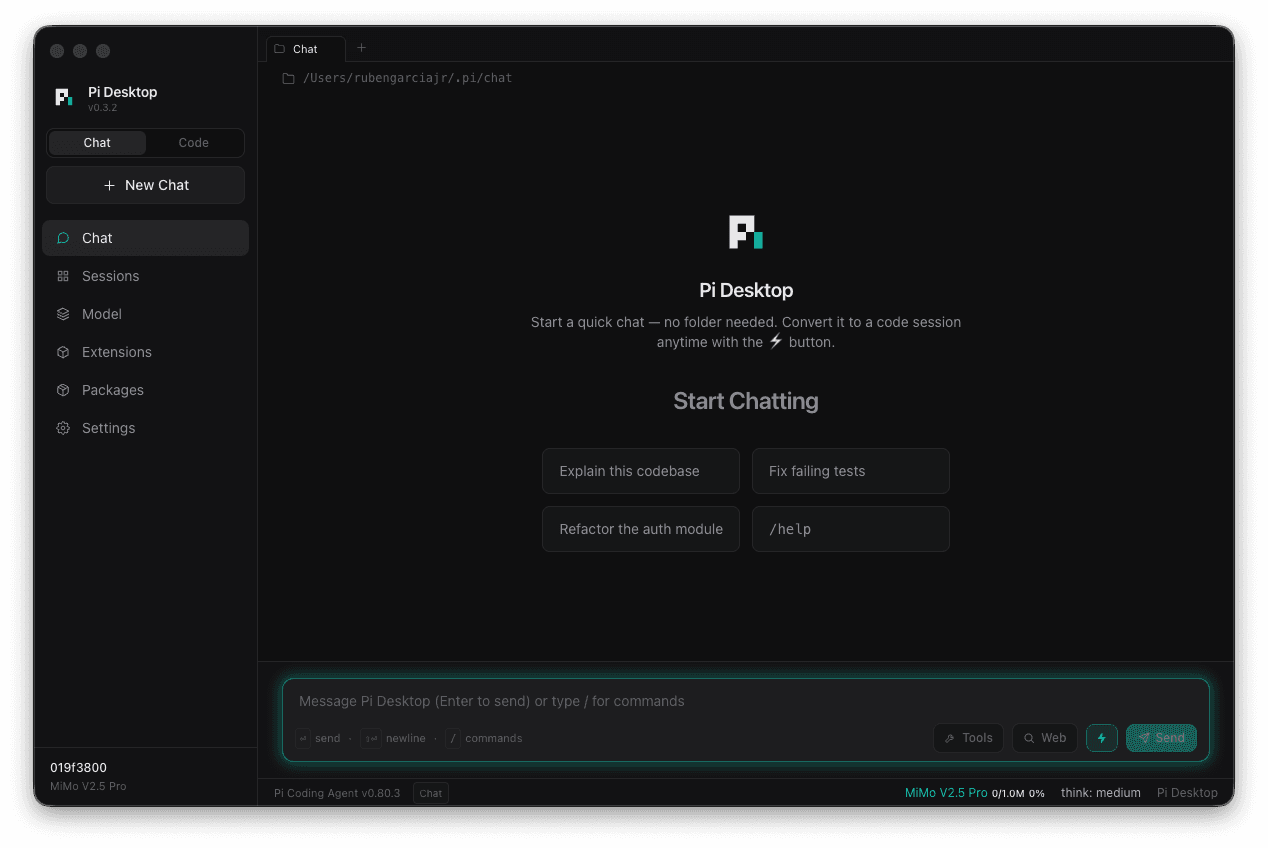
Everything you need
A complete desktop coding environment. No terminal required, no compromises.
Pi Routing (Mixture of Agents)
A Pi Desktop exclusive. Build a team of models that answer every prompt in parallel, synthesize a briefing, and let your main model build on their combined analysis.
Tag Team (Sequential Relay)
A Pi Desktop exclusive. Chain models to work in sequence — the starter builds, then tags the next model to review, improve, and finalize in a fresh tab, automatically.
Worktree Sessions
Run agents in parallel. Each worktree session gets its own isolated git checkout on a fresh branch, so one agent can rewrite your codebase while your main folder and other sessions stay untouched.
Launches into Chat
Open the app and start typing — no folder picker, no setup. A Chat / Code toggle switches to full project sessions the moment you need them.
Convert to Code
Turn any conversation into a real project session. Pick a folder and the whole chat is carried forward as context — nothing lost.
Multi-Tab Sessions
Run many isolated agent sessions at once, like browser tabs. Each keeps its own model, working folder, history, and context.
Web Search Built In
Flip on web search mid-conversation with zero config. Add your own Exa, Perplexity, or Gemini keys for more power.
Never Overflows
Per-session auto-compaction summarizes old context before it hits the limit. A live usage meter shows exactly where you stand.
Bring Any Model
Presets for Claude, GPT/Codex, GLM, MiniMax, MiMo, and Grok — plus your own. Per-tab switching with thinking-level control.
GitHub Integration
Create or attach repos and push/pull with visual sync status — plus a badge that glows the moment a session has unpushed changes.
Extensions & Skills
Browse, install, and remove Pi packages right in the app. Memory, subagents, plan mode, web access — one click each.
Private & Native
Native macOS vibrancy, System / Dark / Light themes, and seven accents. Keys and tokens encrypted at rest in the macOS keychain.
See it in action
A desktop coding experience designed for flow state.
Natural conversation with your code
Real-time streaming responses with markdown rendering, syntax-highlighted code blocks, and collapsible tool outputs. Smart auto-scroll keeps you focused.
Add error handling to the API routes and write tests
I'll add comprehensive error handling and create tests for your API routes. Let me start by examining the current structure.
Extend everything
Install powerful extensions from the Pi ecosystem. One click from the Packages tab, or use the CLI.
pi-memory
Persistent memory across sessions. Learns corrections, preferences, and coding patterns automatically.
pi install @samfp/pi-memorypi-subagents
Delegate work to focused child agents — reviewer, planner, worker, scout, and oracle roles.
pi install pi-subagentspi-plan-mode
Codex-like plan mode. Plan before executing — review the approach, then approve to run.
pi install @narumitw/pi-plan-modepi-web-access
Web search and content fetching for the agent. Search the web, fetch docs, and read URLs.
pi install pi-web-accesscontext-mode
Context management with semantic indexing. Save tokens with smart context compression.
pi install context-modeMore on npm
Browse the full Pi package registry. New extensions published by the community every week.
Browse npm →What's new
Shipping fast. Here's what landed in the latest releases.
- ⑂ Worktree sessions — run agents in parallel: the new Worktree button gives a session its own isolated git worktree on a fresh branch, so an agent can rewrite half your codebase while your main folder and other sessions stay untouched.
- Worktree sessions get a ⑂ branch tab title and badge, and “Remove Worktree…” refuses to discard uncommitted work without asking first.
- A tidier conversation stream: giant code blocks, long pastes, diffs, and verbose tool output now start collapsed with a “Show all N lines” button, and folder headers show each folder’s own git branch and status.
- Reliability update: reasoning-capable custom models now keep their thinking detail across turns, and choosing a model or thinking level for one chat no longer changes your global default.
- Smoother GitHub Copilot sign-in — it now backs off politely when rate-limited. Under the hood, the Pi engine moves from 0.84.1 to 0.84.3.
- Claude Opus 5 is now available — via Anthropic, Amazon Bedrock, or GitHub Copilot (with a 1M-token context window) — all with extended thinking, the new “xhigh” level, and prompt caching.
- New sign-in providers: OpenRouter and Kimi Code (account sign-in, no API key), plus Baseten, the Qwen Token Plan family, and local models via llama.cpp — search, download, and load from Hugging Face with live progress.
- Fewer interruptions: sign-ins refresh ~5 minutes before they expire, dropped DNS lookups and transient provider errors retry on their own, and model-list refreshes only ask for what changed. Pi engine moves to 0.84.1.
- Quick presets work again: adding a model from a preset could fail with a 401 because the preset saved a provider without a usable API key — presets now use a stable provider name, and a missing key is caught when you save rather than at the first request.
- Subscription sign-ins update immediately — the xAI and ChatGPT badges flip to Connected the moment you approve the device code, instead of waiting for a restart — and the sign-in dialog now shows the provider’s real name (“Connect xAI (Grok)”).
- Model errors are now visible: when a provider rejects a request or retries run out, Pi Desktop shows the error instead of the turn silently stopping on a frozen “Thinking…”.
- Update and restart in one click: the update banner downloads the new version, installs it in place, and relaunches for you — no more dragging the app to Applications. If auto-install can’t run, it falls back to opening the installer in Finder.
- New models — Kimi K3 and xAI Grok 4.5 — arrive with the Pi SDK 0.80.10 upgrade and appear in the model switcher (⌘M) automatically.
- Modernized the model & auth layer onto the Pi SDK’s unified model runtime, removing the fragile module loader behind the v0.5.6 packaging bug — Pi Routing and Tag Team are more robust in the installed app, and your existing sign-ins carry over.
- Right-click any session to favorite or delete it, and sessions in a favorited folder now show a star indicator on the card so you can spot your favorites at a glance.
- Pi Routing report card: after every run, a collapsible card shows each team member’s full response, confidence score, and the synthesized briefing — full transparency into what your multi-agent team contributed.
- Real-time per-agent progress (“2/3 models responded”), plus a branded status-bar indicator and a pulsing tab icon so you can spot which tab is running multi-agent work.
- Mixture of Agents (Pi Routing) is now a top-level sidebar item, right below Tag Team — both multi-model features side by side instead of buried in Settings.
- Pi Routing (Mixture of Agents) now works in the packaged app — fixed an asar bundling issue that stopped the engine from loading, so MOA and Tag Team both run in the installed DMG.
- Streaming freeze fix: the UI can no longer get stuck on “Thinking…” after a model finishes — streaming now resets on three independent signals plus a 30-second watchdog.
- Fixes: Tag Team now uses your final-stage handoff prompt, Pi Routing respects your configured confidence threshold, model IDs containing “/” (e.g. OpenRouter) select correctly, and update checks handle pre-release versions.
- New “max” thinking level, on-demand syntax highlighting for faster loads, and an upgrade to Electron 41 + Vite 6 with a hardened in-app updater.
- New Codex models — GPT-5.6 Luna, Sol, and Terra — are available with your ChatGPT sign-in (via Pi SDK 0.80.5), and Claude Sonnet 5 joins the GitHub Copilot catalog.
- Long Codex sessions stay connected: connections rotate before the backend’s 60-minute limit, and the Copilot device-code sign-in no longer appears to hang.
- Open in external editor: a prompt-bar button opens your draft in the editor of your choice (e.g. VS Code with `code --wait`), waits while you edit, then pulls the result back in — in both chat and code sessions.
- New models pull in the moment you connect (no restart), a Compact / Comfortable / Spacious message-spacing control lands in Settings → Appearance, and tab titles update live when a session is renamed.
- Pi Routing and Tag Team toggles now show just their icon until a team is active, and both are available in code sessions — not only chat.
- Tag Team gets its own collaboration icon everywhere it appears — the sidebar, chat toolbar, handoff tabs, and Tag Team panel.
- 🔗 Tag Team (Sequential Model Relay) — the opposite of Mixture of Agents: models work in sequence, each one tagging the next in a fresh tab to build on the previous model’s work automatically, guided by custom handoff prompts.
- Build multi-stage teams (e.g. build → review → finalize) in the new Tag Team sidebar panel, with TAG badges in the tab bar marking relay handoffs. The Pi Routing toggle now shows the active team’s name.
- Pi Routing (Mixture of Agents) now works — fixed a packaging bug that stopped the engine from loading, so team fan-out, aggregation, and the score-and-re-query loop all run.
- Test a team against your in-progress draft before saving, and each member row shows a colored provider badge the moment you pick a model.
- Custom-model fixes now apply to all your models automatically on launch, and editing a model’s API key takes effect immediately — no restart.
- Fixed a “No API key” error when selecting a newly added local model — it now works right away, with no restart.
- Fixed local models staying hidden from the switcher — local servers now get a harmless placeholder key automatically, so they appear immediately.
- Models you add, edit, or remove now appear in the model switcher (⌘M) instantly — no new tab or restart needed.
- Test connection now lists a local server’s available models as clickable chips — click one to fill in the Model ID.
- Edit any custom model in place instead of removing and re-adding it — leave the API key blank to keep the current one.
- Connect a local model in two clicks: a new Local preset in Add Model fills in a localhost template for Ollama, LM Studio, or llama.cpp — no need to remember the endpoint.
- A Test connection button pings your local server before you save, confirming it’s reachable and your chosen model is available.
- 🧠 Pi Routing (Mixture of Agents) — a Pi Desktop exclusive: assemble a team of models (Claude, GPT, GLM, Grok…) that answer each prompt in parallel, then synthesize their insights into a briefing the main model builds on.
- Basic mode runs a single synthesis pass; Advanced mode scores each member 0–10 and auto-re-queries weak responses across up to 5 layers. Toggle it from the new Pi Routing button in the chat toolbar.
- Redesigned Sessions panel: sessions are now bordered cards, with the active session highlighted by an accent border, glow ring, and “current” label.
- The panel is now clearly separated from the chat area, and your working folder is marked in accent color in the header and favorites.
- Interactive file paths: click any file path in a message, tool call, or command output to reveal it in Finder or copy its full, relative, or file name.
- Conversations now open scrolled to the newest message instead of jumping back to the oldest.
- Favorited folders now persist across restarts and updates — saved to a file in the app’s data folder instead of browser storage, with existing favorites migrated automatically.
- One tab per folder: reopening an already-open folder jumps to its existing tab instead of a duplicate — across Sessions, favorites, the + button, drag-and-drop, the sidebar, and the macOS New Session menu.
- The working-folder path at the top of a chat is now clickable — click it to reveal the folder in Finder.
- Fixed crash-on-launch on Apple Silicon: the in-app updater now clears the macOS quarantine flag from the downloaded DMG so the updated app opens cleanly past Gatekeeper.
- “Start Chatting” reuses the current tab instead of opening a duplicate, and focuses the prompt immediately.
- Glowing input border now appears reliably on every empty chat — no app restart needed.
- One-click in-app updates: the DMG downloads in-app with a live progress bar, then opens the installer in Finder.
- Sidebar version badge is single-sourced from package.json, so it can’t drift out of sync.
- 🎉 Public release — the full codebase is now open source on GitHub.
- Anonymous in-app update checks against the GitHub releases API — no token, no setup.
- Major performance overhaul: 5-second UI freezes eliminated and the renderer bundle nearly halved.
- Upgraded to Pi SDK 0.80.3 (Claude Sonnet 5, GPT-5.5 default) with reasoning-token counts in the cost tooltip.
- Security audit remediation: fixed shell command injection in GitHub and package operations.
- Per-tab event routing hardened — events without a tab ID are dropped instead of hitting the active tab.